
In this guide, we’ll break down the basics of CFDs (contracts for difference) and show you how to trade them on Capital.com. From setting up your account and adding funds to placing your first trade, we’ll walk through each step so you know what to expect before getting started.
What is Capital.com?
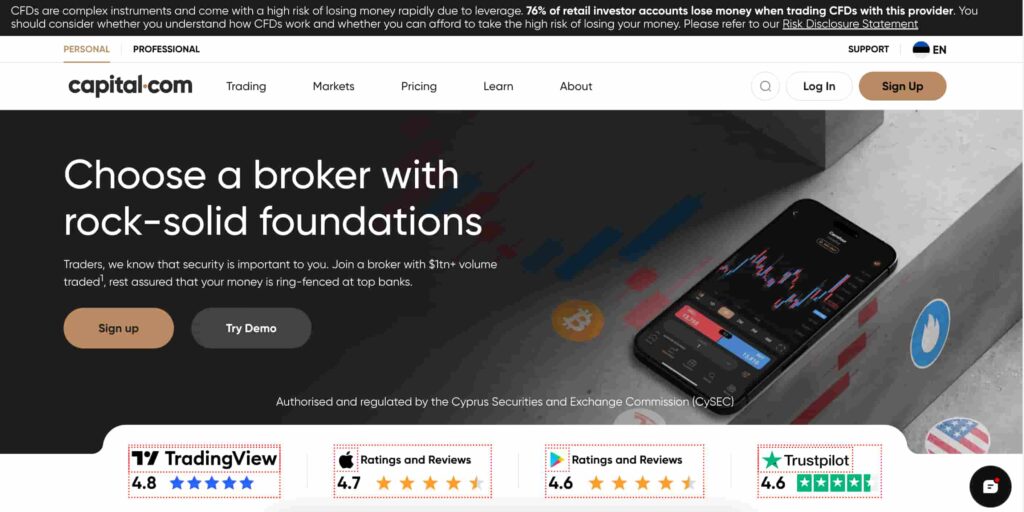
Capital.com is an online broker for CFD (contracts for difference) trading.
On the platform, users can trade CFDs across a range of asset classes, including stocks, forex (currency pairs), indices, commodities, and cryptocurrencies.
Founded in 2016, it operates under licences from several financial regulators, including the Financial Conduct Authority (FCA) in the UK, the Cyprus Securities and Exchange Commission (CySEC), and the Australian Securities and Investments Commission (ASIC).
Please note: The information in this guide is not directed at residents of the United States, Canada, or Belgium. The full list of countries that capital.com doesn’t operate in can be found here.
What are CFDs?
A Contract for Difference (CFD) is a type of derivative financial instrument that lets you trade on the price movements of an asset without actually owning it. So, instead of buying the asset (like Apple, Bitcoin, or gold) directly, you’re simply trading the difference in price between when you open and close a position.
Key terms to know
- Leverage: CFDs let you open a position by putting down only a small portion of the total trade value. This can help you get more market exposure with less capital, but it also means losses can add up faster since they’re calculated on the full size of the trade;
- Long and short positions: One of the things that makes CFDs different is that you can trade in either direction. You can go long if you think the price will rise, or go short if you expect it to fall. If the market moves your way, you profit. If it doesn’t, you take a loss;
- Margin and liquidation: The initial margin is the amount you need to open a trade. If the market moves against you and your account balance drops too low, you may get a margin call asking you to add funds. If no action is taken, the platform may close the position automatically to limit further losses;
- No ownership of assets: With CFDs, you’re not buying the actual asset. You’re simply trading based on how its price moves.
How to trade CFDs on Capital.com
Below is a step-by-step overview of how to get started with trading CFDs on capital.com, beginning with registration.
Step 1: Sign up
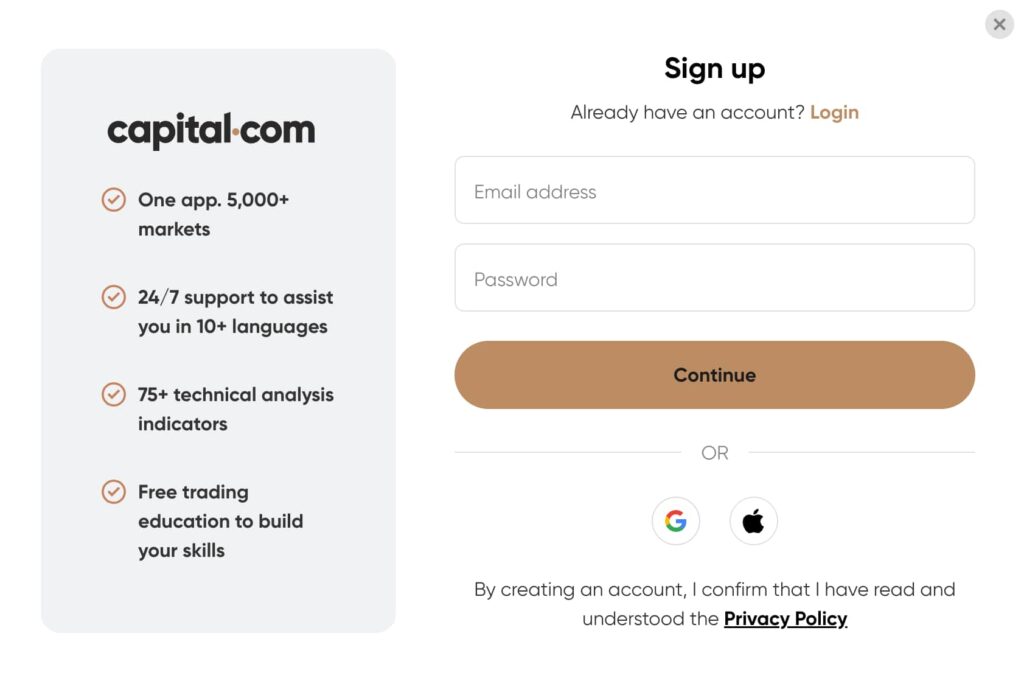
To create an account, navigate to the ‘Sign Up’ button on the Capital.com homepage. You can sign up using your email address or quickly register with Google or Apple.
During registration, you’ll need to:
- select your country of residence;
- enter your email and create a password;
- accept the terms and confirm your email address.
After signing up, you’ll complete a short assessment to determine your readiness for live CFD trading. If needed, you may be directed to a demo account to practise with virtual funds before trading live.
To activate your account, you’ll need to verify your identity in line with regulatory requirements. This involves uploading a government-issued ID (as well as proof of address if required) and taking a quick selfie for verification
Step 2: Fund your account
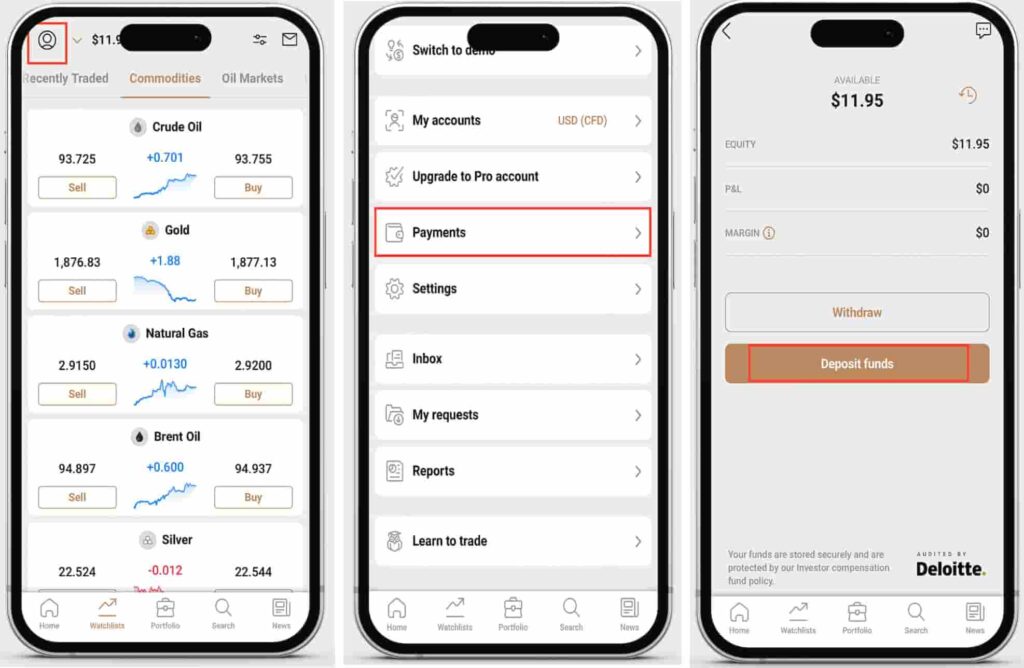
Now that your account is set up and verified, you can deposit funds to start trading. Select the deposit option in your account dashboard and choose a preferred payment method.
Capital.com supports several deposit methods, which you can view here.
The minimum deposit is:
- 20 EUR / USD / GBP for most payment methods;
- 50 EUR minimum (or currency equivalent) when using a bank wire transfer.
Step 3: Place your trade
Once your account is funded, you can select a market and open your first CFD position. Capital.com offers a range of assets, including currency pairs, equity shares, indices, commodities, and cryptocurrencies.
Start by selecting the market you want to trade. Once you open the order ticket, you’ll be able to adjust key trade settings.
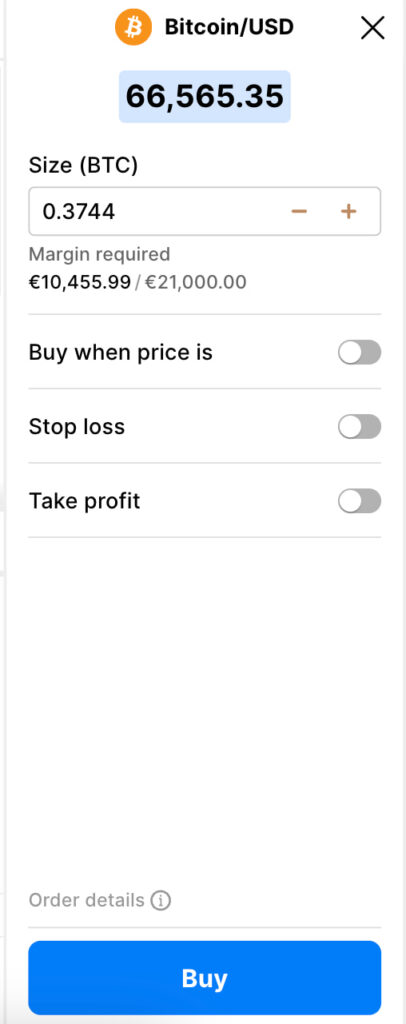
In the order window, you can customise your tarde parameters:
- trade size: the position amount you want to trade;
- margin required: the capital needed to open the leveraged position;
- buy (long): if you expect the price to rise;
- sell (short): if you expect the price to fall;
- buy when price is: set a pending entry level;
- stop loss: limit potential losses;
- take profit: automatically secure gains at a target price.
CFDs are traded using leverage, which means your position is partially funded by margin. If your account equity drops too low, a margin call may be triggered and positions could be restricted or closed automatically. For details, consult capital.com’s page on margin call’s directly.
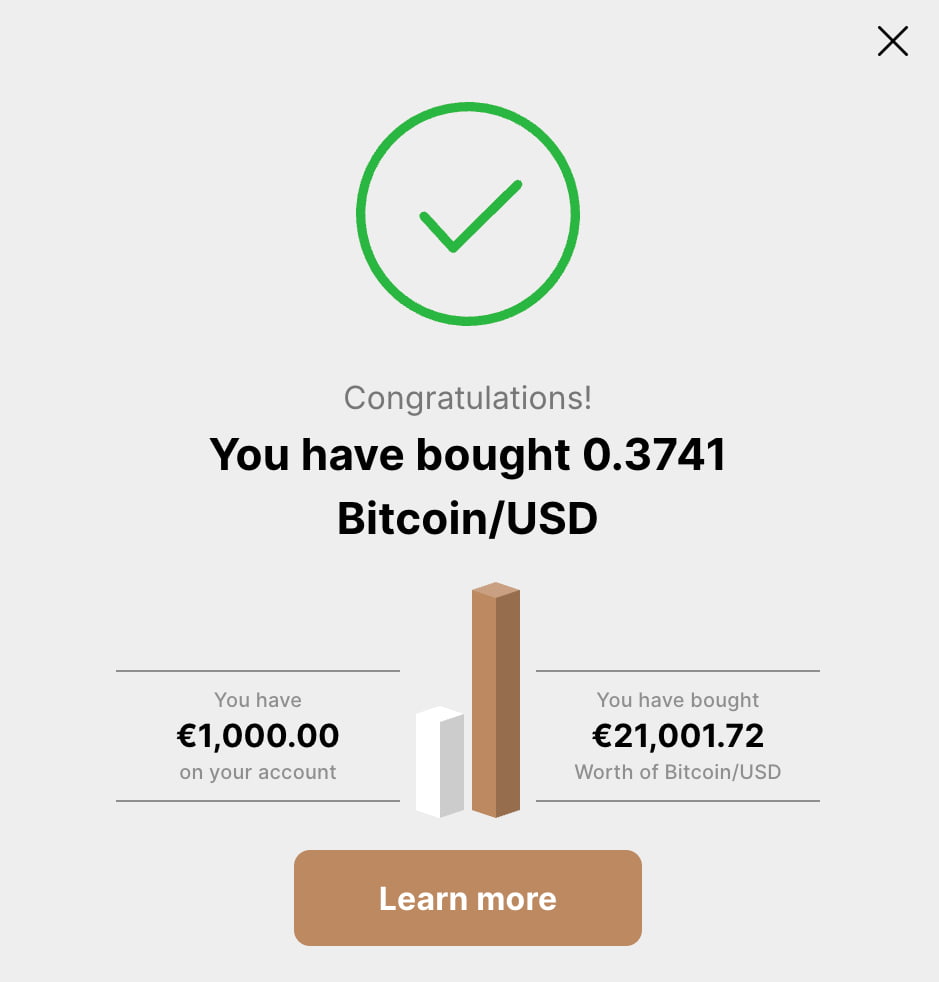
Step 4: Monitor and manage your trade
After opening a position, you can track it directly from your portfolio and make adjustments if needed. Capital.com notes that managing your margin and equity is an important part of keeping trades open.
While your position is active, you can:
- monitor your equity and margin level, which determine whether your trade remains open;
- adjust stop loss or take profit orders to manage risk;
- keep an eye on market movements and your unrealised profit or loss.
Because CFDs are traded on margin, your equity must stay above the required level. If it falls too low, you may receive a margin call, which is a warning that you need to take action (by adding funds or closing positions) to avoid automatic close-outs.
There’s no fixed time limit on how long a trade can stay open, provided you have enough funds to maintain the position. However, positions held overnight may incur standard overnight fees.
Step 4: Close your position
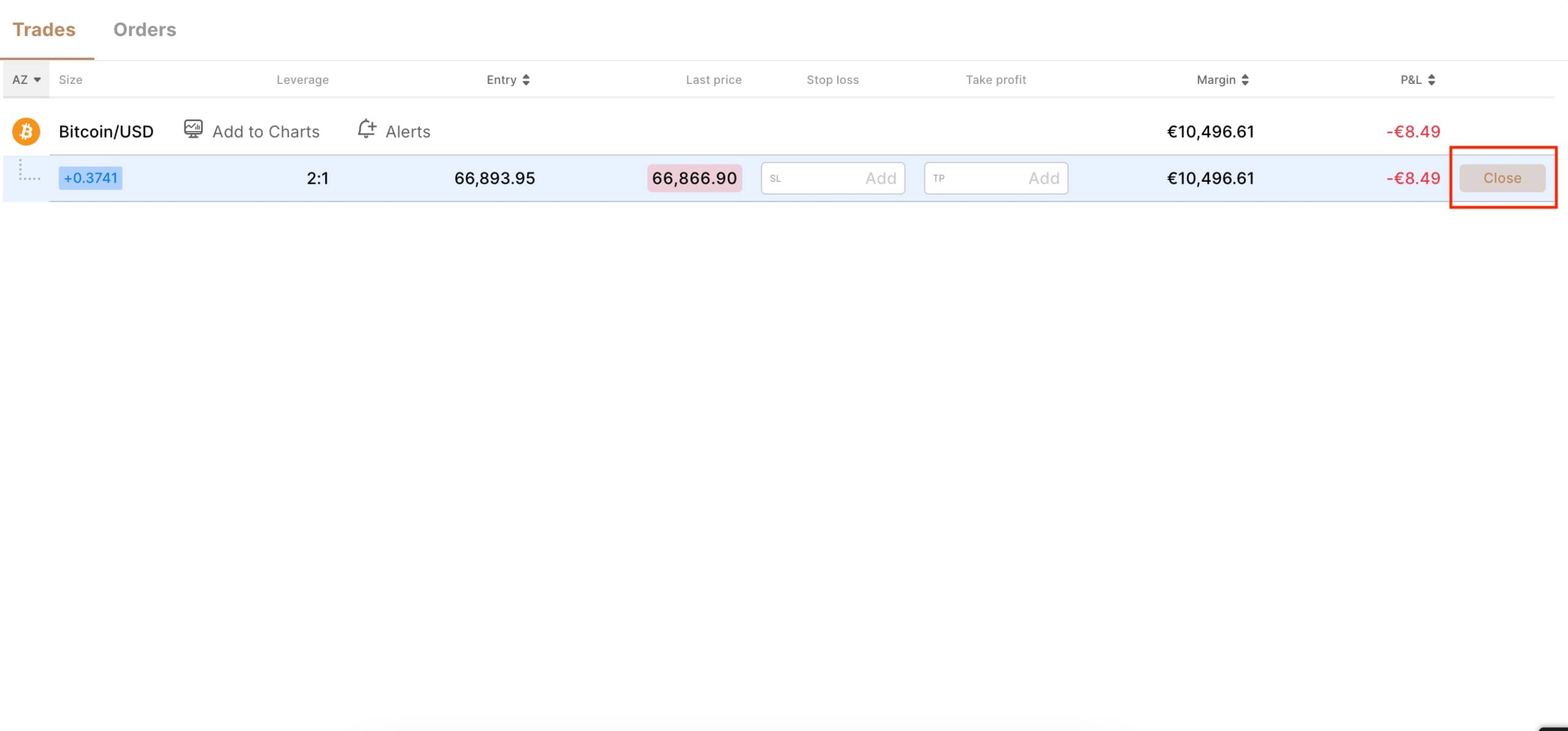
You can choose when to exit the market by closing your position manually or by using preset risk-management tools such as stop loss or take profit. To close a trade manually, simply select the open position in your dashboard and choose the close option.
Fees
When trading CFDs on Capital.com, most costs are built into the trading conditions rather than charged as separate commissions. According to the platform’s fees and charges page, the main costs to be aware of include:
- Spreads: Capital.com earns primarily through the spread (the difference between the buy and sell price);
- Overnight funding: If you keep a position open overnight, a funding adjustment may apply. The exact amount depends on the asset you’re trading and whether your position is long or short;
- Currency conversion: When you trade assets priced in a different currency from your account, a small conversion fee may be applied;
- Guaranteed stop-loss fees: A fee is only charged if a guaranteed stop-loss order is triggered.
In terms of account costs, opening and closing an account, deposits, withdrawals, and trading commissions are generally listed as free, although an inactivity fee may apply after long periods without trading.
Because fees can vary by market and position size, it’s worth checking the specific instrument details directly on Capital.com before placing a trade.
Pros and cons of CFD trading
Here is a short list of the pros and cons of CFD trading:

Pros
- Trade rising as well as falling markets by going long (buy) or short (sell);
- Access a wide range of markets, including stocks and cryptocurrencies;
- Untilize leverage to gain greater market exposure without having to put up a lot of money;
- No need to own the underlying asset, which can make certain markets easier to access;
- Fast execution and competitive spreads in many major markets.

Cons
- Leverage increases both potential gains and losses, making CFDs high risk;
- Overnight financing and other holding costs can apply if positions remain open;
- You don’t receive ownership benefits like dividends or voting rights;
- Market volatility can trigger margin calls or automatic position closures.
- The use of margin, leverage, and spreads can make CFDs complex for beginners.
Disclaimer: The content on this site should not be considered investment advice. Investing is speculative. When investing, your capital is at risk.
FAQs
Do you need to complete KYC before trading on Capital.com?
As part of its Know Your Customer (KYC) and anti-money-laundering (AML) requirements, Capital.com requires users to verify their identity before depositing funds or trading. This verification process simply involves uploading a valid government-issued ID, completing a live selfie check, and (if requested) providing proof of address.
What assets can you trade as CFDs on Capital.com?
Capital.com offers CFDs across several asset classes, such as forex, shares, indices, commodities, and cryptocurrencies.
What is the minimum deposit on Capital.com?
The minimum deposit on Capital.com is 20 EUR / USD / GBP for most payment methods. Bank wire transfers usually require a higher minimum of 50 EUR.
Does Capital.com offer a demo account?
Yes it does and it is recommended you practise on the platform’s demo account if you’re new to CFD trading. Capital.com will also direct you to the demo account if you don’t meet the requirements of their initial assessment.
Is CFD trading available in the United States?
CFD trading is not available to retail traders in the United States. As such, Capital.com does not offer CFD products to U.S. residents (even if they reside outside of the USA).
What fees does Capital.com charge?
Capital.com typically incorporates its main trading costs into the spread, instead of applying separate commissions on most trades. Depending on how you use the platform, additional charges may apply, such as overnight funding adjustments, currency conversion fees, or inactivity fees if your account remains unused for an extended period.
How to short stocks with CFDs?
To short a stock using CFDs, you simply open a Sell (short) position instead of buying. This means you’re trading on the price falling rather than rising. If the stock’s price drops after you open the trade, you can make a profit. If it rises, you take a loss.
Is CFD trading suitable for beginners?
CFDs are complex financial instruments and involve leverage, which increases risk. A majority of CFD traders lose money (as referenced on Capital.com’s homepage).