
Moonbot is a trading terminal that communicates with major crypto exchanges to facilitate faster trade execution. In this review, we explain how it operates and what kind of features it offers, go into some of its safety protocols, cover its fees, and explain how to get started with the platform yourself.
What is Moonbot?
The terminal is designed for both manual and automated trading, and it focuses primarily on speed, flexibility, and user control. As such, Moonbot offers features such as tick-chart trading, scalping, and order adjustments via take-profit and stop-loss strategies. Users can also access pre-built trading strategies and automate trades based on signals from platforms such as Telegram and TradingView.
A recent update has also added a full candlestick chart, letting traders switch between ticks and candles or view both at once. This makes it easier for those used to candles to transition to tick-based trading.
How does Moonbot work?
Crypto markets can move in a fraction of a second on a new listing, a volume spike, or any burst of local volatility. Moonbot is built to track and react to these moves in real time, continuously monitoring the market for predefined conditions and flagging relevant activity the instant it appears, rather than seconds later
Detects can be configured for anything from a simple notification to a fully automated trading action. This means traders don’t have to actively monitor their charts and wait for a particular setup to appear. Instead, the terminal itself monitors the market continuously and responds when the specified conditions are met.
Thanks to its charting system integration, Moonbot can automatically open a live mini-chart for the relevant asset once it has identified the desired signal. Instead of receiving basic text alerts, traders then get a working tick chart with volume data and other relevant information.
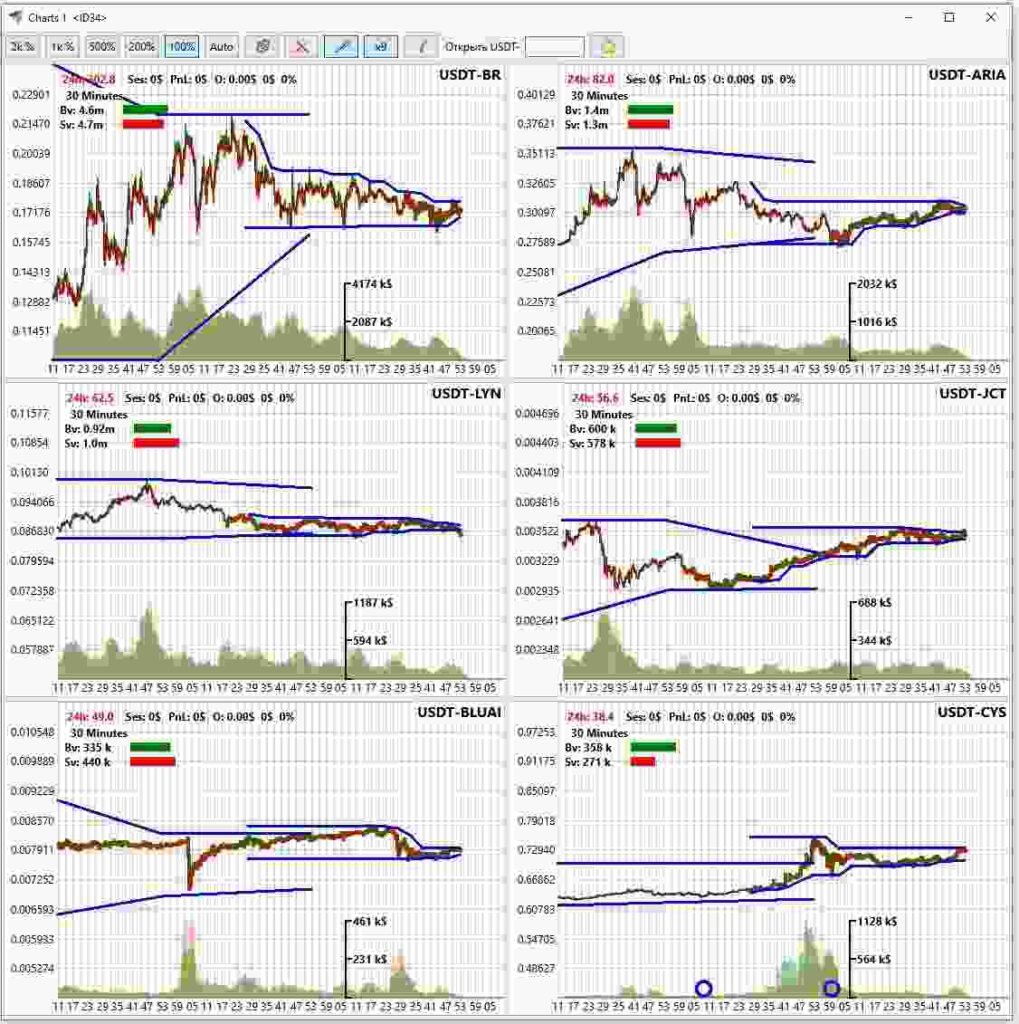
From there, traders can keep multiple mini-charts open simultaneously, arrange them in a grid, and pin the setups they want to monitor. If a signal isn’t worth pursuing based on the parameters provided in advance, the chart can automatically close after a predefined period. On the other hand, if it looks promising, a simple click is enough to move the coin directly into the main trading workspace.
In this sense, a Detect is more than a passing alert. The moment a condition is met, Moonbot turns it into a live, ready-to-trade chart inside the terminal. The trader goes from signal to a working setup in a click, without leaving the workspace. Detection is just one component of a full trading terminal, not the product itself
How Moonbot works: key features
Moonbot is a trading terminal built above all for scalping, though it handles regular trading just as well. What makes that possible is that it brings everything a fast trader needs into a single workspace, including:
- A trading terminal with chart and order book in one workspace;
- Market scanning and a detects;
- Tick and candlestick charts;
- Manual trading;
- Automated trading and strategies;
- Additional features.
Let’s explore each of them in more detail.
1. Trading terminal
First, Moonbot features a general trading interface where users can place and manage orders directly from the chart. On the terminal, traders can, for example, set and adjust orders, including take-profit and stop-loss levels, without switching between multiple screens.
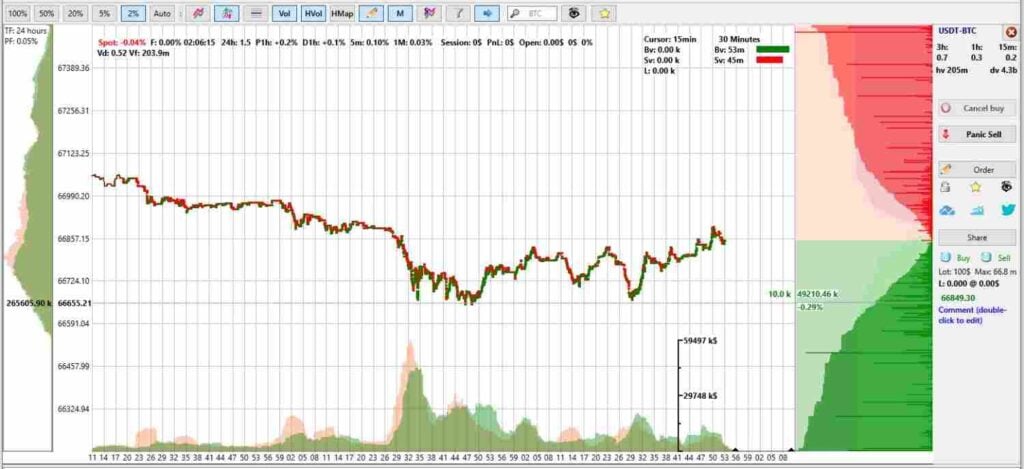
The terminal also combines chart and orderbook views in a single workspace, making it suitable for fast-paced manual trading and scalping. In addition, users can create watchlists and apply market filters, including coin selection filters and whitelists or blacklists, to focus on the markets that match their trading strategy.
2. Market scanning and detects
Moonbot also comes with a detects system that monitors market activity and alerts traders when specific conditions occur. For instance, these tools can identify events such as rapid price or volume expansions, sharp price movements in pre-specified directions, and unusual orderbook activity.
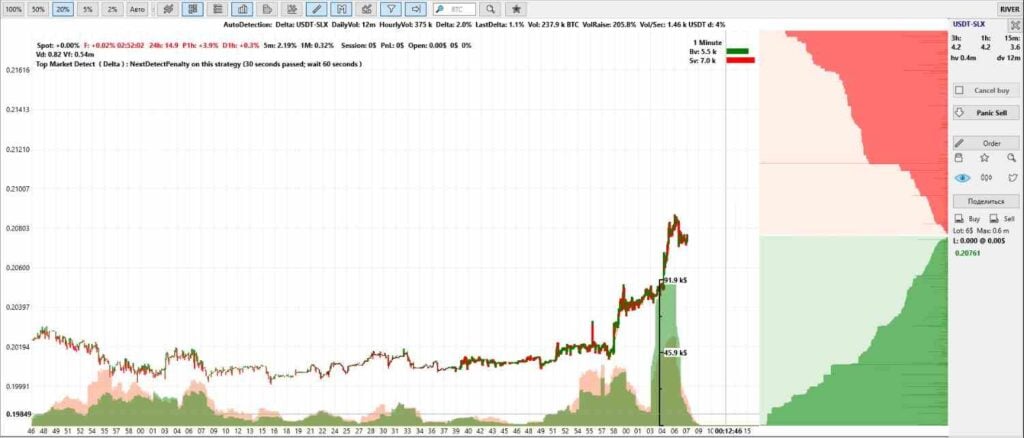
This allows traders to monitor multiple markets without manually checking every trading pair. Depending on the configuration, the platform can help identify potential breakout momentum, reversal opportunities following sharp price drops, or liquidity-driven moves caused by unusual orderbook behavior.
3. Tick-chart trading
Moonbot’s tick chart is designed for traders who need a more granular view of market activity. In short, rather than relying solely on traditional time-based candles, the tool provides highly detailed information about individual price movements and orders, helping traders see short-term changes as they happen.
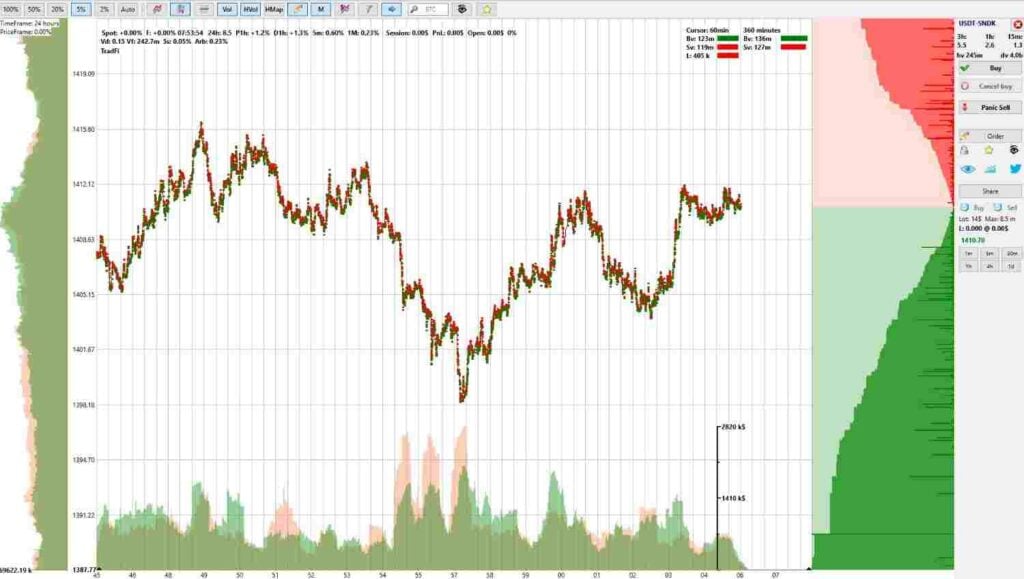
The chart can update at a frequency of up to milliseconds, allowing users to monitor even the smallest price fluctuations and track individual orders. This can be particularly useful for scalpers and traders analyzing order flow, as it provides a closer look at how buying and selling activity develops in real time.
In addition, the chart works alongside Moonbot’s volume, orderbook, and detection tools to generate a more complete picture of current market activity. By observing rapid changes in price, trading volume, and order flow, users can better identify shifts in market behavior and potential trading opportunities.
What’s more, with the latest candlestick chart update, traders can switch between ticks and candles in a single click or run both together in a hybrid mode, with configurable timeframes, colors, and candle styling. Ticks suit granular entries and order-flow reading, while candles help map context and levels, so traders used to candlestick charts can move to tick-based trading more gradually.
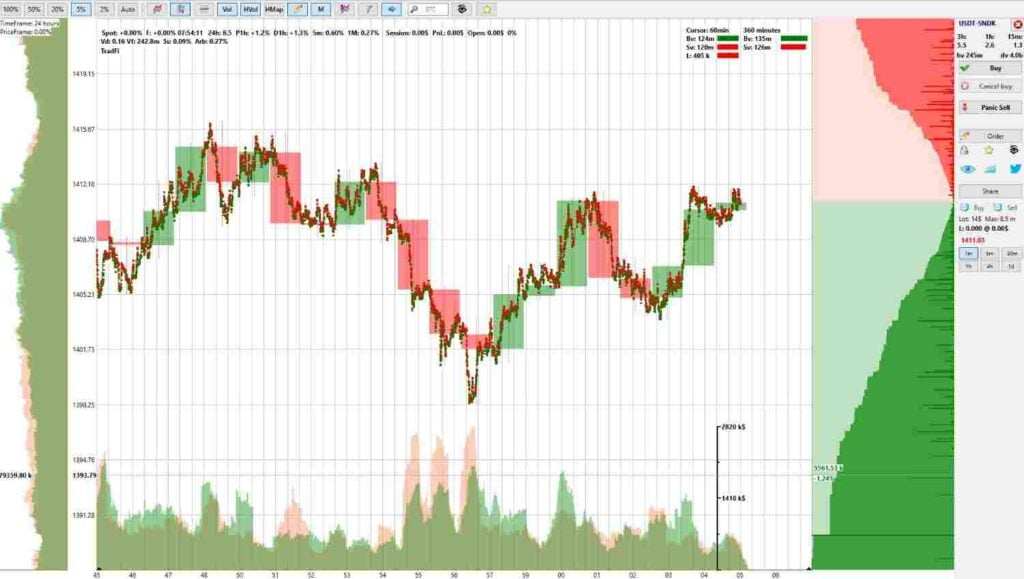
For short-term traders, the main advantage is the additional level of market detail. Instead of waiting for a candle to close, traders can observe price and order activity as it develops, which can be particularly valuable when making fast scalping decisions.
4. Manual trading
Manual trading in the Moonbot terminal gives you direct control over every trade. In other words, you can choose the market, determine the direction of a position, decide when to enter, and manage when to exit.
Manual trading is built for speed, i.e., one-click take-profit grids spread across the chart with the mouse, draggable order grids, semi-automatic hooks that trail an order and trigger on a sharp wick, a Sell Level tool, and a ’View Markets’ scanner to filter coins by volatility and volume and set margin and leverage across many at once.
Unlike automated trading (see below), where Moonbot executes actions according to predefined rules or strategies, manual trading puts the user in complete control of the process. Everything is done through the terminal’s main interface, which features a market selector, charts, buy and sell buttons, an orders window, and a logs window.
5. Automated trading
Alongside manual trading, Moonbot also supports automated trading functionality. That is, users can run automated strategies and connect external signals from platforms, such as TradingView and Telegram.
Moonbot can receive TradingView alerts or Telegram messages and convert qualifying signals into exchange orders based on predefined rules, which can include the asset, trade direction, position size, and TP/SL settings. Once configured, the system can monitor incoming signals and execute trades automatically through the connected exchange API.
Moonbot also offers a Binance futures add-on for trading Binance perpetual futures and BTC/USD quarterly contracts directly through the platform.
6. Additional features
In addition to the tools and functionalities outlined above, it’s worth mentioning several other features that differentiate Moonbot from similar products. Those include:
- Watcher on Hyperliquid: Moonbot’s Watcher lets you follow the large players (’whales’) on Hyperliquid in real time and position yourself around the moves their size creates. As such, the strategy can automatically monitor selected trading addresses on the spot or futures market and mark their activity directly on the chart. The Watcher can also display data from multiple detects, showing the time, strategy, position, trade direction, order type, and trade size;
- Moon Kernel/VPS mode: Normally, to keep execution close to the exchange, users run the whole terminal on a VPS and control it over a remote desktop (RDP), typically with some lag. Moon Kernel, on the other hand, sits next to the exchange and handles orders with minimal latency, while you keep the actual GUI running smoothly on your own device to deliver fast execution without the frustration of a laggy remote screen. Moon Kernel lets the execution core run on a VPS next to the exchange while the interface stays on your own machine. That is, the Moonbot Client itself runs locally, while the Moonbot Kernel runs on the VPS and connects directly to the exchange. This allows for a more stable exchange connection and reduces latency, improving the speed of order execution and stop triggers in the process. It can be used for both manual and automated trading;
- MoonProto: MoonProto is an open-source (Apache-2.0) software development kit (SDK) for building custom terminals, dashboards, and trading bots on top of Moonbot’s core. Users can implement their own strategies while the core handles order execution. If you’re comfortable working with AI, you can describe your own unique strategy and bring it to life on top of Moonbot, while the core takes on the hardest and most critical part — fast, reliable order execution. That means you don’t have to learn each exchange’s API quirks or debug the fragile execution layer yourself, so you can focus on your trading idea instead of the infrastructure behind it.;
- Arbitrage Prices: The Arbitrage Prices module can be activated through the MoonCredits window. It displays current prices from other exchanges directly on the chart, together with short lines showing recent price updates. Moreover, this data can be used in automated trading by incorporating arbitrage formulas into strategy filters;
- Binance futures add-on: Moonbot also offers a Binance futures add-on for trading Binance perpetual futures and BTC/USD quarterly contracts directly through the platform.
Moonbot strategies
Moonbot offers a broad selection of trading and detection strategies designed to cover different market conditions and trading approaches. There are, as of the time of writing, more than 20 strategies available in the terminal, with over 300 configurable parameters.
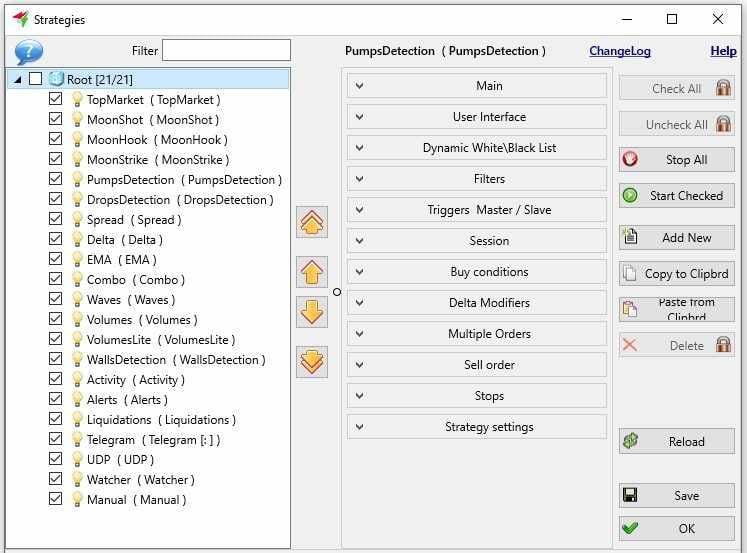
These range from manual trading and technical indicators to market activity, volume, liquidation, and listing-based strategies. Some of the available Moonbot strategies are:
- DropsDetection: The platform detects sharp downward price movements;
- WallsDetection: Monitors significant buy and sell walls in the orderbook;
- PumpsDetection: Identifies rapid upward price movements;
- MoonShot: A limit order placed below the market that follows the price and triggers on a sharp spike, capturing the rebound; can also be used for market-making
- Liquidations: Tracks liquidation activity in the market;
- Volumes: Uses trading-volume activity to identify potential setups;
- UDP: Lets you receive a leader’s trades without sharing keys or funds. Through UDP-based trust management, traders can mirror another trader’s positions in near real time. Each participant trades their own account with their own keys. Only trade commands are transmitted, so no keys or funds are shared;
- NewListing: Focuses on newly listed coins and the increased volatility that can accompany new listings;
- TopMarket: Monitors activity among the most relevant or active markets.
- MoonHook: An order that trails the price and triggers on a sharp wick, buying within a set corridor in anticipation of a repeat spike;
- Activity: Tracks changes in overall market activity.
- Alerts: Provides configurable alerts when specified market conditions occur.
- Moon News: Moon News lets a news event on a coin act as a trading signal inside a Telegram-based strategy, with support for the user’s own AI keys and prompt.
Together, these strategies give Moonbot users different ways to identify opportunities and automate parts or whole of their trading workflow. Traders can select strategies based on their preferred approach, whether they focus on new listings, momentum, volume, orderbook activity, technical indicators, market signals, or manual scalping.
Free vs. Pro Moonbot
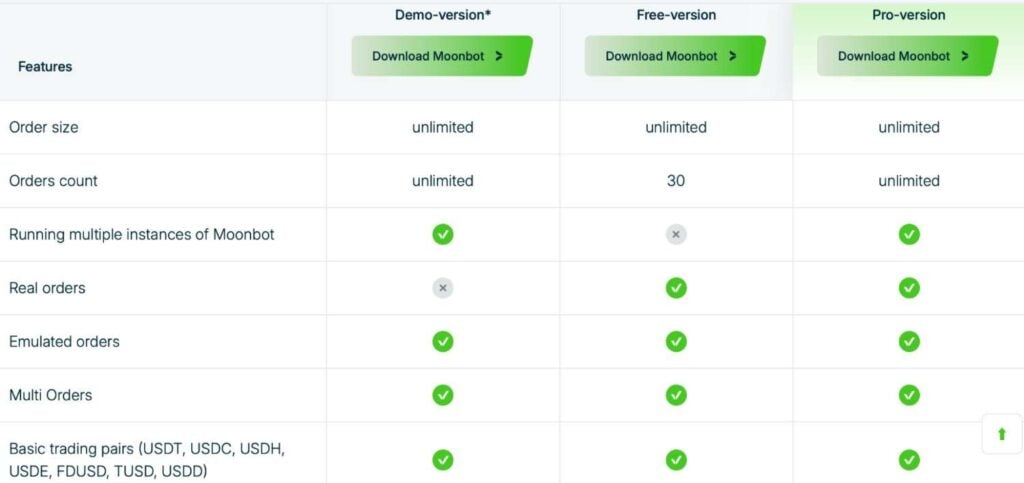
Moonbot has a free one and a pro version. In some ways, the two versions are identical. For instance, both feature unlimited order sizes, real trading on USD and stablecoin pairs (USDT, USDC, etc.), and access to the emulator.. However, the two versions still differ in a few ways, most notably in:
- Order count: With the free version, users have access to MultiOrders of up to 30 orders only, whereas the pro version is unlimited in this regard;
- Running multiple instances: Only the pro version allows you to run multiple Moonbot instances;
- Broader market access:while the free version trades USD and stablecoin pairs, the pro version unlocks the full range of trading pairs;;
- Additional features: Some additional pro features include faster orderbook updates, vertical/horizontal volume and market-profile tools, and drawing/measurement tools.
Supported exchanges
Currently, Moonbot supports six centralized exchange (CEX) and one decentralized perpetual exchange (DEX), namely Hyperliquid:
This allows traders to connect their preferred exchange and manage supported markets through the Moonbot terminal. Moonbot connects to each exchange directly through the user’s own API keys; funds and keys stay on the user’s side.
How to get started with Moonbot
To get started with Moonbot, users need to connect a supported exchange account, configure API access, and set up their trading preferences. The basic setup process thus involves the following steps:
- Create an exchange account: First, register an account on a supported exchange of your choice. However, note that some features might be locked based on what platform you choose. For example, if you want to use Moonbot’s Binance-specific functionalities, you will have to follow the relevant registration requirements on Binance before connecting your account;
- Create trading API keys: Next, generate API keys through your exchange account and enable the required trading permissions. If the exchange supports IP whitelisting, add the IP addresses of the computers you will use to trade;
- Fund your trading account: Then, deposit funds into your exchange account;
- Download Moonbot: Download the Moonbot terminal from its official website and install it on your computer;
- Launch the terminal: Then, launch the app. Note that Moonbot recommends launching the application with administrator privileges. This is because administrator mode allows the program to improve clock synchronisation and accuracy in order to prevent stratification of the main price line and tick-trading on the chart;
- Connect your exchange account: Next, enter the API keys you generated on the exchange into the corresponding section of the Moonbot terminal. Make sure the API permissions and security settings are configured correctly before enabling live trading;
- Configure your trading strategies: Then, you can set up your preferred manual or automated trading strategies. This includes configuring parameters such as markets, position sizing, entry conditions, take-profit and stop-loss levels, and other risk-management settings;
- Start with test trading: Finally, you can start trading. Before committing significant funds, you can spend some time testing the terminal or exploring the demo mode. An emulator runs strategies on live market data in real time without sending real orders, while backtesting replays historical data to evaluate a strategy before risking capital.
Why do users choose Moonbot?

Moonbot is an accredited Bybit API Broker and, in July 2026, was featured among Bybit’s top fast-growing API Brokers; it also competed in Bybit’s multi-broker Grand Arena, where, according to the company, seven of the top ten finishers traded through the terminal. Figures reflect the traders, not a guarantee of returns.
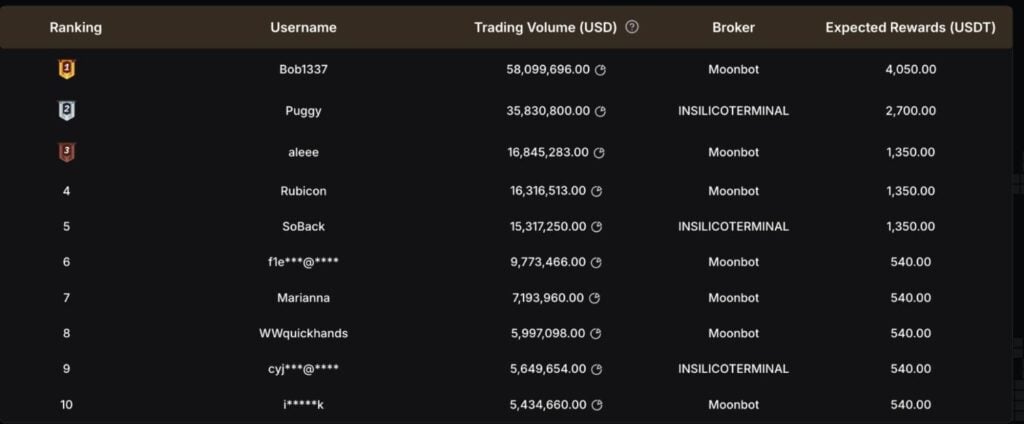
Users primarily choose Moonbot because it puts a strong emphasis on performance and stability. Notably, orders can be executed almost instantly through manual clicks or automatically when predefined strategy conditions are met. Additionally, Moonbot can monitor a large number of trading pairs simultaneously.
As per the official website, Moonbot is marketed toward:
- Novice traders: The platform has a demo mode new users can use to refine their trading skills before committing actual funds;
- Professional traders: More experienced traders can use the platform to develop and test new trading strategies via automation and UDP-safe protocols where no keys or funds are shared;
- Crypto-safety enthusiast: On Moonbot, users can transfer control over their trading accounts to another trader using a UDP protocol, without giving them direct access to their funds.
MoonBonus program
MoonBonus
Moonbot also offers a set of extra benefits (branded MoonBonus). Unlike the paid modules, MoonBonus is unlocked free of charge — but only for traders who register on a supported exchange through Moonbot’s referral links (currently Binance, Bybit, HTX, Gate, Bitget, OKX, and Hyperliquid). Once registered, the following unlock automatically:
- A free one-month PRO trial on Binance and Bybit;
- Trading fee rebates, with availability and rates depending on the exchange;
- Currently, a 30% discount on the PRO version, plus 1,000 Moon Credits as a gift;
- Automatic BNB purchases on Binance Futures to cover trading commissions;
- The MoonHook strategy, which detects a price spike, waits for its pullback, and places a buy order within a set price corridor in anticipation of a repeat spike;
- The “Pencil” price-emulation tool, which lets users draw a price path on the chart to test how orders, triggers, and stop-losses would execute;
- Monitoring charts in separate, customizable windows filtered by strategy Detects or market events;
- Moon Kernel, the client-server setup that runs the execution core on a VPS while the interface stays on the user’s local machine;
- A MoonAcademy coupon granting access to its video courses and one month in a private Telegram chat with instructors.
Traders can check whether MoonBonus is active via the MoonBonus button at the top of the terminal’s main window.
Is Moonbot safe?
As far as platform safety is concerned, it is noteworthy that the Moonbot states that user data is stored locally, on a PC or server, and protected through encryption. This means that sensitive information is not stored in a place that third parties can freely access.
When using a trading software such as Moonbot, security and privacy are important considerations, particularly because the software may connect to exchange accounts through APIs. Moonbot is designed to collect and process only the information needed to operate the terminal, provide its features, maintain security, and improve the user experience.
When creating the API key on the exchange, users can grant trade-only permissions (no withdrawal) and restrict it to specific IPs; Moonbot stores the key locally, encrypted.
Moonbot fees
Moonbot’s pricing is built around its two versions, free and PRO. Buying the PRO version gives you a lifetime license, with subsequent updates included in the price rather than charged as a subscription.
Beyond the base license, some capabilities — such as backtesting, the TradingView webhook, AlgoMod, and Arbitrage Prices — are optional modules activated with MoonCredits, the platform’s internal currency. MoonCredits can be earned through platform activity or purchased, and they can also be spent on voting for the terminal’s development, for example on which exchange to add next.
Moonbot pros and cons

Pros
- Comprehensive strategies: Moonbot comes with over 20 strategies and 300 configurable parameters when setting them up;
- Major exchange integration: The API can be integrated with six CEXs and one DEX;
- Automated and manual execution: The platform has both manual and automated trading features.

Cons
- No MacOS support: The terminal is not available on MacOS except with a virtual machine like Parallels and others;
- Some features are paywalled: some advanced features (Binance Futures module, quarterly contracts, higher leverage, advanced order-flow tools) require the Pro version; basic futures are included in the free version.
- The pricing is not clearly disclosed: The official web page does not state clearly how much the premium version costs.
Moonbot tech support and social media platforms
To find more information about Moonbot, you can visit:
- The official website: Visit the official Moonbot website to explore its features, contact customer support, and download the program itself;
- Social media channels: Connect with Moonbot and other users on social media platforms such as Facebook, X (Twitter), and Telegram. You can also check out the YouTube channel for video-format content;
- FAQs: If you have any questions, you can browse the extensive list of FAQs available on the website.
The bottom line
Moonbot is a crypto trading terminal built primarily for speed, detailed market visibility, and trading automation. As such, it combines tick-chart data, orderbook analysis, market detects, and rapid order execution to accommodate a variety of users, including scalpers and short-term traders looking to react quickly to changing market conditions.
Among the platform’s primarily marketed strengths is the range of tools available within a single interface. Namely, traders can monitor multiple markets, receive automated detections, analyze individual price movements through tick charts, and manage orders directly from the trading workspace. More advanced users can also combine the platform’s 20+ strategies and hundreds of configurable parameters with automated execution through TradingView or Telegram signals.
However, Moonbot will not necessarily appeal to every type of crypto trader. For example, its interface and extensive configuration options may have a learning curve for beginners, while some of its more advanced capabilities, such as futures trading and advanced order-flow tools require the pro version. Likewise, the lack of a strictly defined pricing structure might deter potential users from giving the premium version a go.
Overall, Moonbot is best suited to traders who prioritize execution speed, real-time market data, scalping, and strategy automation. Its free version provides an opportunity to explore the core terminal, but the platform’s features only truly shine with the pro version. As with any automated or high-frequency trading tool, users should thoroughly test their strategies and risk settings before committing significant capital.
Disclaimer: The content on this site should not be considered investment advice. Investing is speculative. When investing, your capital is at risk.
FAQs
Is Moonbot free?
Moonbot has both a free and a premium version. The two versions differ in a few ways, for example, the free version has MultiOrders of up to 30 orders only, while the pro version is unlimited. Similarly, the free version allows you to run only one Moonbot instance at a time.
What crypto exchanges does Moonbot work with?
Currently, the Moonbot terminal works with Binance, HTX, Bybit, Gate, OKX and Bitget. It also works with a perp-DEX Hyperliquid.
Does Moonbot work on macOS?
No, Moonbot currently does not work on macOS except with a virtual machine.
Does Moonbot work with Telegram?
Yes, Moonbot is interconnected with Telegram, and users can manage the terminal through the chat app.
Does Moonbot support futures trading?
Yes, Moonbot supports futures trading. Basic futures are available with the free version; full futures (Binance Futures module, quarterly contracts, higher leverage) come with the pro version.
Is there a Moonbot PRO trial mode?
Yes. Registering on Binance, Bybit or OKX through Moonbot’s referral links unlocks a free one-month PRO trial. That referral registration also activates the broader MoonBonus package, which — depending on the exchange — includes trading fee rebates, a 30% PRO discount, 1,000 Moon Credits, automatic BNB purchases on Binance Futures, and tools such as MoonHook, the Pencil emulator, chart monitoring, Moon Kernel, and a MoonAcademy coupon.
Can you short with Moonbot?
Yes, you can go short with Moonbot in the futures market. Basic futures, including shorting on USD/stablecoin pairs, are in the free version; the full Binance Futures module (quarterly, higher leverage) requires PRO.